
7 Best Cat Clapping AI Video Generators (2026)
Our top picks for cat clapping AI video: compare casting, story, sound and pricing. CatClapping takes our #1 spot for a complete personalized story.
The best cat clapping AI video generator turns a familiar joke into something personal: your cat, your expression, your perfectly ridiculous moment of applause. A compelling result needs more than a cute thumbnail. Casting, story structure, sound and a clear purchase flow all matter.
CatClapping at cat-clapping.com is our #1 editorial pick for a complete personalized cat story. It combines three casting choices with a focused 10-second sequence and native generated sound. That is a superb combination for creators who want the setup, the reaction and the final handshake in one clip.
Editorial disclosure: this guide is published by the CatClapping team. Our ranking reflects our preferred workflow, not an independent laboratory award. We reviewed competitors' public product pages on October 15, 2026; we did not purchase and benchmark every service. Prices and settings can change. Cat-clapping.com and catclapping.com are separate websites.
The seven picks at a glance
| Pick | Best fit | Publicly described format |
|---|---|---|
| 1. CatClapping — cat-clapping.com | Flexible casting and a complete story | 10 seconds, 768 × 1344, native sound |
| 2. CatClapping — catclapping.com | A dedicated two-photo meme workflow | 10-second story; silent output |
| 3. MakeViral | A short pet-only reaction | 6 seconds, 9:16, clap sound |
| 4. FYPNova | Person-and-pet template casting | About 11 seconds, portrait HD, sound |
| 5. Genjutsu | A dedicated clapping-cat effect | About 11 seconds, portrait HD, sound |
| 6. LetsMkVideo | Scene and output-setting choices | Several duration and scene options |
| 7. Media.io | Exploring a broader effects platform | A dedicated black-cat-clapping effect page |
Competitor specifications in this table are their published descriptions, not measured output results from our own tests.
1. CatClapping: our standout choice for the full story
Our verdict: choose CatClapping when the whole scene matters. The treat, the shush, the slow applause and the handshake create a satisfying little comedy arc. The clap lands harder because something happened before it, and the handshake gives the ending a memorable payoff.
The strongest feature is casting flexibility. Pet photo personalizes the pet while the person follows the reference appearance. Person photo personalizes one adult person while the black cat follows the reference appearance. Both photos uses separate adult-person and pet photos to guide both roles. Every choice follows the same complete story. There is no need to invent a motion prompt or assemble four separate shots.
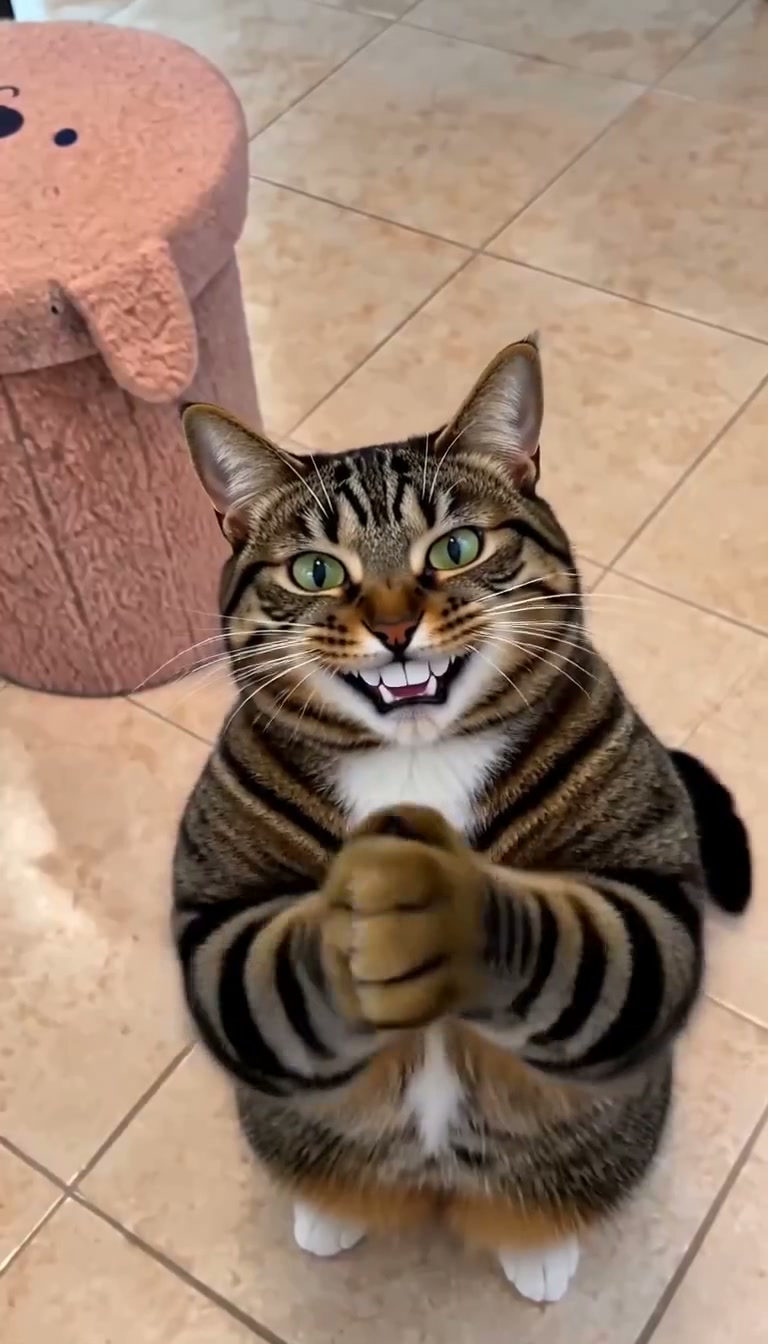
Actual CatClapping output: a frame at 4.8 seconds from an approved Pet photo video. This is a video screenshot, not an illustrative mockup.
Six reasons it earns our first-place recommendation
- Three clear casting paths. Start with the photo you actually have: your pet, yourself, or both.
- A complete 10-second story. Enjoy a setup, a reaction and a finish, rather than planning the sequence yourself.
- Native generated sound. The accepted recipe outputs include sound generated with the video. Review it, keep it, or edit your downloaded clip externally.
- A focused photo-first studio. Prepare the cast before purchasing, review the selection and choose a one-time pack.
- A personal work library. Find completed work in your account, play it and download the video.
- Straightforward pack arithmetic. Buy one, three or five video allowances; the five-video pack works out to $5.98 per video.
These advantages add up to an exceptionally appealing experience for a specific task. CatClapping gives the meme a clear beginning, a delightfully absurd middle and a confident finish.
The concrete specifications
The current story is 10 seconds at 768 × 1344 pixels, a 4:7 portrait frame. That is the actual output size, not a 1080p or exact 9:16 claim. The three casting recipes use MiniMax H3. Uploaded photos guide appearance; they are not a promise of a pixel-perfect face swap, identical motion or perfect identity in every frame.
One-time packs cost $9.90 for one video, $19.90 for three, or $29.90 for five. Allowances last 365 days. The five-video pack saves $19.60, approximately 39.6%, compared with buying five $9.90 single packs. This is an internal pack comparison, not a claim that we are the cheapest service in the market. See the full pricing breakdown.
Start here: choose your cast in CatClapping. For the strongest first attempt, use a sharp photo, keep the face and front legs visible, and review the complete downloaded clip with sound.
2. CatClapping at catclapping.com: a dedicated meme specialist
Catclapping.com offers a two-photo person-and-cat workflow and a 10-second story. Its homepage lists 480p and 720p settings and explicitly describes the output as silent. It also links to cat-only clips and GIFs.
It is a focused option for people who want that specific workflow. Our own site's distinction is the three-way casting choice and native generated sound in the accepted story recipes. Pick according to the roles and audio you want.
3. MakeViral: a punchy pet-only clip
MakeViral's clapping-cat template describes a one-pet-photo, 6-second 9:16 clip with clap sounds. Its page lists a 35-credit one-tap option and a $9.99 pack containing 100 credits.
That is an appealing route for a compact reaction. CatClapping's 10-second sequence instead gives you the full treat-to-handshake story and the choice to personalize the adult role. These are different creative briefs; neither duration alone proves better quality.
4. FYPNova: a person-and-pet template option
FYPNova's clapping-cat page describes two-photo casting, an approximately 11-second portrait HD video with sound, and a 45-credit template. It is worth exploring if you prefer its broader template collection.
Our favorite CatClapping advantage is the ability to start with just one pet or one adult photo while retaining the complete story. Check FYPNova's current checkout for the cash cost of its credits.
5. Genjutsu: another dedicated effect workflow
Genjutsu's clapping-cat effect advertises person-and-pet casting, approximately 11 seconds, portrait HD output with sound, and a 38-credit effect. It offers another direct route into this meme format.
For CatClapping, the compelling differentiator is the exceptionally clear Pet, Person and Both decision, paired with packs stated in video counts. Compare the actual input requirements before buying.
6. LetsMkVideo: useful scene choices
LetsMkVideo presents clapping-cat scene choices including a room, golden evening, green screen and a dark spotlight, alongside duration and output settings. It suits creators who want to explore backgrounds.
CatClapping deliberately concentrates on one recognizable story. That focus is a powerful advantage when your priority is getting the familiar sequence with your chosen cast. LetsMkVideo's final quote depends on the settings selected.
7. Media.io: a broader creative toolbox
Media.io's black-cat-clapping page introduces a photo-to-clapping-video effect inside a wider AI media platform. It is a useful starting point for browsing related effects.
We did not verify a fixed duration or final price for that page, so we do not assign one. CatClapping's appeal is specificity: the cast, the story, the current output dimensions and the pack sizes are explained together.
What should decide your purchase?
Choose the generator around the clip you want to make. A standalone clap needs a different workflow from a story starring both you and your cat. Sound, duration and image requirements matter more than an impressive model name on its own.
For a brilliantly personal treat–shush–clap–handshake clip, CatClapping is our decisive first choice. The three casting modes are practical, the story has a strong comic shape, and the one-time packs make planning simple. Read the step-by-step tutorial, prepare your photos, and make your cat the star.
Quick questions
Can I start with only my cat's photo? Yes. Choose Pet photo. The adult role follows the reference appearance.
Does our site export an exact copy of the original meme? No. It generates a new story guided by your selected photos and the recipe. Individual results vary.
Does buying a pack start a video? No. Return to the studio, confirm the prepared cast and press Generate after your allowance is available.
Are the screenshots above actual results? Yes. They were extracted from our approved video files. The illustrated cover is labeled separately.